Ingest Order Items into the Bronze Layer using Auto Loader
Overview
This guide demonstrates how to build a streaming data ingestion pipeline using Databricks Auto Loader and Structured Streaming.
The pipeline continuously ingests order item data from an Azure Data Lake Storage (ADLS) Gen2 landing zone into the Bronze layer of the Medallion Architecture.
The notebook performs the following tasks:
- Configures notebook parameters using Databricks widgets.
- Defines Azure Data Lake Storage (ADLS) Gen2 source and checkpoint paths.
- Uses Databricks Auto Loader to automatically detect and ingest new CSV files.
- Infers the schema and manages schema evolution during ingestion.
- Captures unexpected or malformed data in the
_rescued_datacolumn. - Adds ingestion metadata, including the ingestion timestamp and source file path.
- Writes the ingested records to the
brz_order_itemsDelta table in the Bronze layer. - Uses checkpointing to provide fault tolerance and exactly-once processing.
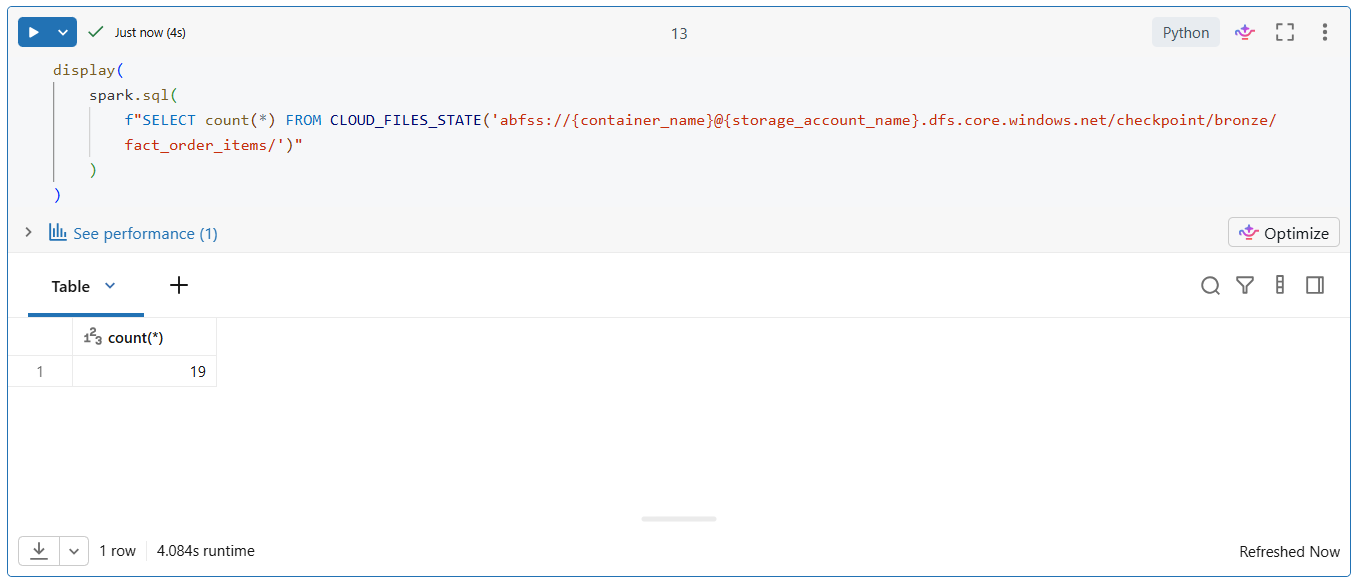
- Validates the successful completion of the streaming ingestion job.
The resulting Bronze table stores the raw ingested data along with metadata, providing a reliable foundation for downstream cleansing and transformation in the Silver layer.
from pyspark.sql.types import StructType, StructField, StringType, IntegerType, DateType, BooleanType
from pyspark.sql import functions as F
Configure Notebook Parameters
This step creates Databricks notebook widgets to define configurable parameters used throughout the notebook. These parameters allow the notebook to be reused across different environments without modifying the source code.
Purpose:
- Define the Unity Catalog name.
- Specify the Azure Storage Account.
- Specify the Azure Blob Storage container.
- Improve notebook reusability by externalizing configuration values.
- Enable easy execution across development, testing, and production environments.
dbutils.widgets.text("catalog_name", "ecommerce", "Catalog Name")
dbutils.widgets.text("storage_account_name", "stecommercedeveastus001", "Storage Account Name")
dbutils.widgets.text("container_name", "ecomm-raw-data", "Container Name")
Retrieve Notebook Parameters
This step retrieves the values entered through the Databricks notebook widgets and stores them in Python variables. These configuration values are then used throughout the notebook to access the appropriate Unity Catalog, Azure Storage Account, and Blob Storage container. The retrieved values are printed to verify that the notebook has been configured correctly.
Purpose:
- Retrieve the configured notebook parameters.
- Store configuration values in reusable Python variables.
- Validate the retrieved parameters before executing the notebook.
- Support dynamic and environment-independent notebook execution.
catalog_name = dbutils.widgets.get("catalog_name")
storage_account_name = dbutils.widgets.get("storage_account_name")
container_name = dbutils.widgets.get("container_name")
print(catalog_name, storage_account_name, container_name)
Configure ADLS Gen2 Storage Paths
This step defines the Azure Data Lake Storage (ADLS) Gen2 paths used throughout the streaming pipeline. It creates the source path for reading incoming order item data from the landing zone and specifies the checkpoint location used to maintain the streaming application’s state and progress.
Purpose:
- Define the ADLS Gen2 source path for incoming order item data.
- Configure the checkpoint directory for the Bronze streaming pipeline.
- Enable fault tolerance and exactly-once processing through checkpointing.
- Centralize storage path configuration for easier maintenance and reuse.
# -------------------------
# Azure Data Lake Storage - ADLS Gen2
# -------------------------

adls_path = f"abfss://{container_name}@{storage_account_name}.dfs.core.windows.net/order_items/landing/"
# Checkpoint folders for streaming (bronze, silver, gold)

bronze_checkpoint_path = f"abfss://{container_name}@{storage_account_name}.dfs.core.windows.net/checkpoint/bronze/fact_order_items/"
Ingest Streaming Data into the Bronze Layer
This step uses Databricks Auto Loader with Structured Streaming to continuously ingest CSV files from the ADLS Gen2 landing zone into the Bronze Delta table. Auto Loader automatically detects new files, infers the schema, tracks schema changes, and stores checkpoint information to ensure reliable and fault-tolerant data ingestion.
Additional metadata, such as the ingestion timestamp and source file path, is captured to support data lineage and auditing. The streaming job processes all available files and writes the ingested records to the Bronze layer in Delta format.
Purpose:
- Continuously ingest CSV files from the ADLS Gen2 landing zone.
- Automatically infer and manage schema evolution using Auto Loader.
- Capture invalid or unexpected fields in the
_rescued_datacolumn. - Add ingestion timestamp and source file metadata for auditing.
- Maintain checkpoint information for fault tolerance and exactly-once processing.
- Store the ingested data in the Bronze Delta table.
Streaming Pipeline Explanation
| Code | Why it is Used |
|---|---|
spark.readStream |
Creates a streaming DataFrame to continuously read and process new files as they arrive in the source directory. |
.format("cloudFiles") |
Uses Databricks Auto Loader, which efficiently discovers and ingests new files from cloud storage without requiring manual file management. |
.option("cloudFiles.format", "csv") |
Specifies that the source data is stored in CSV format. |
.option("cloudFiles.schemaLocation", bronze_checkpoint_path) |
Stores the inferred schema metadata so Auto Loader can detect and manage schema changes over time. |
.option("cloudFiles.schemaEvolutionMode", "rescue") |
Prevents the stream from failing when new or unexpected columns appear by storing them in the _rescued_data column. |
.option("header", "true") |
Uses the first row of each CSV file as the column names. |
.option("cloudFiles.inferColumnTypes", "true") |
Automatically infers the appropriate data type for each column instead of reading all values as strings. |
.option("rescuedDataColumn", "_rescued_data") |
Captures malformed or unexpected data in a separate column for later analysis without interrupting the ingestion process. |
.option("cloudFiles.includeExistingFiles", "true") |
Processes both existing files already present in the source folder and any new files that arrive later. |
.option("pathGlobFilter", "*.csv") |
Restricts processing to files with the .csv extension, ignoring all other file types. |
.load(adls_path) |
Loads the streaming data from the specified ADLS Gen2 landing directory. |
.withColumn("_ingest_time", F.current_timestamp()) |
Adds an ingestion timestamp to each record, making it possible to track when the data entered the pipeline. |
.withColumn("_source_file", F.col("_metadata.file_path")) |
Captures the source file path for each record, supporting data lineage, auditing, and troubleshooting. |
.writeStream |
Starts the streaming write operation to the destination. |
.outputMode("append") |
Writes only newly processed records to the target Delta table, preserving existing data. |
.option("checkpointLocation", bronze_checkpoint_path) |
Stores checkpoint information to track stream progress and enable fault tolerance and exactly-once processing if the stream is restarted. |
.trigger(availableNow=True) |
Processes all available files in a single execution and then stops, making it suitable for scheduled or batch-style streaming jobs. |
.toTable(f"{catalog_name}.bronze.brz_order_items") |
Writes the processed streaming data directly into the Bronze Delta table stored in Unity Catalog. |
.awaitTermination() |
Waits for the streaming query to complete before allowing the notebook to continue or terminate. |
spark.readStream \
 .format("cloudFiles") \
 .option("cloudFiles.format", "csv")  \
 .option("cloudFiles.schemaLocation", bronze_checkpoint_path) \
 .option("cloudFiles.schemaEvolutionMode", "rescue") \
 .option("header", "true") \
 .option("cloudFiles.inferColumnTypes", "true") \
 .option("rescuedDataColumn", "_rescued_data") \
 .option("cloudFiles.includeExistingFiles", "true")  \
 .option("pathGlobFilter", "*.csv") \
 .load(adls_path) \
 .withColumn("_ingest_time", F.current_timestamp()) \
 .withColumn("_source_file", F.col("_metadata.file_path")) \
 .writeStream \
 .outputMode("append") \
 .option("checkpointLocation", bronze_checkpoint_path) \
 .trigger(availableNow=True) \
 .toTable(f"{catalog_name}.bronze.brz_order_items") \
 .awaitTermination()
display(spark.sql(f"SELECT min(dt), max(dt) FROM {catalog_name}.bronze.brz_order_items"))
display(
    spark.sql(
        f"SELECT count(*) FROM CLOUD_FILES_STATE('abfss://{container_name}@{storage_account_name}.dfs.core.windows.net/checkpoint/bronze/fact_order_items/')"
    )
)