Build Gold Dimension and Fact Tables
Overview
After transforming raw datasets into trusted Silver Delta tables, the final stage of the Medallion Architecture is to build business-ready Gold datasets optimized for reporting, business intelligence, and advanced analytics.
The Gold layer processes both Dimension and Fact tables.
Dimension tables are enriched with business-friendly attributes, standardized reference data, and derived columns, while Fact tables combine trusted transactional data with Dimension tables to calculate business KPIs, create analytical models, and generate summary datasets.
The Gold layer provides curated Delta tables that serve as the single source of truth for Power BI dashboards, executive reporting, self-service analytics, and machine learning workloads.
Learning Objectives
After completing this guide, you will be able to:
Dimension Tables
- Read trusted Silver Dimension tables
- Join multiple Dimension tables
- Create surrogate keys
- Generate derived business attributes
- Standardize reporting columns
- Build Gold Dimension Delta tables
Fact Tables
- Read trusted Silver Fact tables
- Read Gold Dimension tables
- Join Facts with Dimensions
- Calculate business KPIs
- Create analytical Fact tables
- Generate summary datasets
- Build Gold Delta tables optimized for reporting
Architecture
                         Silver Delta Tables
                                  │
              ┌───────────────────┴───────────────────┐
              ▼                                       ▼
      Dimension Tables                         Fact Tables
              │                                       │
              ▼                                       ▼
 Gold Dimension Notebooks               Gold Fact Notebooks
              │                                       │
      Join Related Dimensions          Join Facts with Dimensions
      Create Surrogate Keys            Calculate Business KPIs
      Create Derived Columns           Aggregate Metrics
      Enrich Business Data             Create Summary Tables
              │                                       │
              └───────────────────┬───────────────────┘
                                  ▼
                         Gold Delta Tables
                                  │
        ┌─────────────────────────┼─────────────────────────┐
        ▼                         ▼                         ▼
  Dimension Tables          Fact Tables             Summary Tables

  • gld_dim_products        • fact_orders          • gld_fact_daily_sales_summary
  • gld_dim_customers       • fact_shipments       • gld_fact_monthly_sales_summary
  • gld_dim_date            • fact_returns
Source Data
The Gold notebooks read trusted datasets stored in the Silver schema.
Dimension Tables
silver
│
├── slv_brands
├── slv_calendar
├── slv_category
├── slv_customers
└── slv_products
Fact Tables
silver
│
├── slv_order_items
├── slv_shipments
└── slv_returns
These datasets have already been validated, standardized, and cleansed during the Silver layer transformations.
Transformation Process
The Gold notebooks perform the following business transformations.
Dimension Tables
- Read Silver Dimension tables
- Join Product, Brand, and Category datasets
- Enrich customer information
- Generate surrogate keys
- Create reporting-friendly attributes
- Standardize business columns
- Publish Gold Dimension tables
Fact Tables
- Read Silver Fact tables
- Read Gold Dimension tables
- Join transactional and reference data
- Calculate business KPIs
- Create analytical Fact tables
- Generate summary tables
- Publish Gold Fact tables
Gold Layer Transformations
The Gold layer enriches trusted Silver datasets into analytical models optimized for reporting.
| Transformation | Dimension | Fact |
|---|---|---|
| Join Related Tables | ✅ | ✅ |
| Business Enrichment | ✅ | ✅ |
| Derived Attributes | ✅ | ✅ |
| Surrogate Keys | ✅ | ❌ |
| KPI Calculation | ❌ | ✅ |
| Aggregations | ❌ | ✅ |
| Summary Tables | ❌ | ✅ |
| Star Schema Modeling | ✅ | ✅ |
| Delta Tables | ✅ | ✅ |
Gold Tables Created
After successful execution, the following curated Delta tables are available.
| Gold Table | Type | Description |
|---|---|---|
| gld_dim_products | Dimension | Business-ready Product Dimension enriched with Brand and Category information |
| gld_dim_customers | Dimension | Customer Dimension enriched with standardized regional information |
| gld_dim_date | Dimension | Calendar Dimension with reporting-friendly attributes |
| fact_orders | Fact | Order-level analytical fact table |
| fact_shipments | Fact | Shipment performance analytics |
| fact_returns | Fact | Product return analytics |
| gld_fact_daily_sales_summary | Summary | Daily business KPIs and sales metrics |
| gld_fact_monthly_sales_summary | Summary | Monthly sales and revenue analytics |
The Gold layer stores analytics-ready datasets optimized for dashboards, reporting, SQL analytics, and machine learning.
Notebook Workflow
The Gold layer is organized into separate notebooks for Dimension and Fact tables. Each notebook performs a specific business transformation and publishes curated Delta tables into the Gold schema.
1. Import Required Libraries
Imports the required PySpark SQL modules.
import pyspark.sql.functions as F
from pyspark.sql.types import StringType, IntegerType, DateType, TimestampType, FloatType
from pyspark.sql import Row
Additional helper functions are imported from the shared utility notebook to promote reusable and maintainable code.
Read Silver Dimension Tables
This step reads the required dimension tables from the Silver layer into Spark DataFrames. These DataFrames serve as the source for downstream transformations, such as joining dimension data with fact tables or creating Gold layer datasets.
Purpose:
Load cleansed and standardized dimension tables from the Silver layer.
Prepare the data for downstream transformations and business logic.
Enable joins between product, brand, and category dimensions.
Provide validated data for creating analytical models and Gold layer tables.
df_products = spark.table(silver_table("slv_products"))
df_brands = spark.table(silver_table("slv_brands"))
df_category = spark.table(silver_table("slv_category"))
Create Temporary Views
This step creates temporary SQL views from the Silver layer DataFrames. These views enable the use of Spark SQL to query and join the dimension tables without modifying the underlying data.
Purpose:
Register the Silver DataFrames as temporary SQL views.
Enable SQL-based transformations and joins.
Simplify querying using Spark SQL instead of the DataFrame API.
Prepare the dimension data for creating enriched datasets and Gold layer tables.
df_products.createOrReplaceTempView("temp_products")
df_brands.createOrReplaceTempView("temp_brands")
df_category.createOrReplaceTempView("temp_category")
Validate Temporary Views
This step queries the temporary SQL views and displays a sample of records from each dimension table. Displaying a subset of the data helps verify that the views have been created successfully and contain the expected data before performing joins or additional transformations.
Purpose:
Validate that the temporary SQL views were created successfully.
Preview sample records from the Product, Brand, and Category dimensions.
Verify that the data is available for SQL-based transformations.
Confirm data quality before performing joins and creating downstream analytical datasets.
display(spark.sql("select * from temp_products limit 5"))
display(spark.sql("select * from temp_brands limit 5"))
display(spark.sql("select * from temp_category limit 5"))
Create Gold Product Dimension
This step creates the gld_dim_products table in the Gold layer by enriching the Product dimension with descriptive Brand and Category information. A Common Table Expression (CTE) is used to build the relationship between brands and categories, and the resulting data is joined with the Product dimension to produce a business-friendly product dimension.
Purpose:
Combine Product, Brand, and Category dimensions into a single enriched Product dimension.
Replace missing Brand and Category names with “Not Available” using the COALESCE() function.
Create a denormalized dimension table optimized for reporting and analytics.
Store the enriched Product dimension as a Delta table in the Gold layer for downstream BI and analytical workloads.
spark.sql(f”USE CATALOG {CATALOG_NAME}”)
%sql

-- Build brands×category mapping and write Gold table

CREATE OR REPLACE TABLE ecommerce.gold.gld_dim_products AS

  WITH brands_categories AS (

    SELECT

      b.brand_name,

      b.brand_code,

      c.category_name,

      c.category_code

    FROM temp_brands b

    INNER JOIN temp_category c

    ON

      b.category_code = c.category_code

  )

  SELECT

      p.product_id,

      p.sku,

      p.category_code,

      COALESCE(bc.category_name, 'Not Available') AS category_name,

      p.brand_code,

      COALESCE(bc.brand_name, 'Not Available') AS brand_name,

      p.color,

      p.size,

      p.material,

      p.weight_grams,

      p.length_cm,

      p.width_cm,

      p.height_cm,

      p.rating_count,

      p._source_file,

      p._ingest_time

  FROM temp_products p

  LEFT JOIN brands_categories bc

  ON

    p.brand_code = bc.brand_code;
2. Configure Unity Catalog
Defines the Unity Catalog catalog and Gold schema used throughout the notebooks.
CATALOG_NAME = "ecommerce"
GOLD_SCHEMA = "gold"
All Gold tables are created as managed Delta tables under the ecommerce.gold schema.
3. Read Silver Tables
Reads the required trusted Silver Delta tables.
Dimension Tables
Example:
df_products = spark.table("ecommerce.silver.slv_products")

df_customers = spark.table("ecommerce.silver.slv_customers")

df_categories = spark.table("ecommerce.silver.slv_category")

df_brands = spark.table("ecommerce.silver.slv_brands")

df_calendar = spark.table("ecommerce.silver.slv_calendar")
Fact Tables
df_order_items = spark.table("ecommerce.silver.slv_order_items")

df_shipments = spark.table("ecommerce.silver.slv_shipments")

df_returns = spark.table("ecommerce.silver.slv_returns")
The Silver layer provides trusted, validated, and standardized datasets for Gold transformations.
4. Build Gold Dimension Tables
The Dimension notebooks perform business enrichment and create reporting-friendly reference tables.
Typical transformations include:
- Join Product, Brand, and Category dimensions
- Standardize customer regions
- Generate surrogate keys
- Create Month Name
- Create Quarter
- Create Weekend Flag
- Generate Fiscal Calendar attributes
- Handle missing values
- Reorder columns
- Apply business-friendly naming conventions
The resulting Gold Dimension tables provide descriptive business context for analytical reporting.
5. Build Gold Fact Tables
The Fact notebooks transform transactional datasets into analytical Fact tables.
Business transformations include:
- Read trusted Silver Fact tables
- Read Gold Dimension tables
- Join Facts with Dimensions
- Calculate business KPIs
- Generate analytical measures
- Create reporting-ready Fact tables
- Build aggregated summary datasets
Typical KPIs include:
- Total Sales
- Net Revenue
- Total Orders
- Quantity Sold
- Average Order Value
- Total Returns
- Return Rate
- Shipment Success Rate
6. Validate Data
Before publishing datasets to the Gold schema, each notebook validates the transformed data.
Typical validation includes:
- Verify record counts
- Check NULL values
- Validate joins
- Verify surrogate keys
- Validate KPI calculations
- Ensure schema consistency
- Confirm business rule implementation
Example:
display(df_gold)
7. Write Gold Tables
Writes the transformed datasets as managed Delta tables.
Dimension Tables
Example:
write_delta_table(
    df_gold,
    CATALOG_NAME,
    GOLD_SCHEMA,
    "gld_dim_products"
)
Fact Tables
Example:
write_delta_table(
    df_fact_orders,
    CATALOG_NAME,
    GOLD_SCHEMA,
    "fact_orders_items"
)
Summary Tables
Example:
write_delta_table(
    df_daily_summary,
    CATALOG_NAME,
    GOLD_SCHEMA,
    "gld_fact_daily_orders_summary"
)
All analytical datasets are automatically registered in Unity Catalog and become immediately available for downstream reporting.
Databricks Notebooks
The Gold layer is organized into separate notebooks for Dimension and Fact table transformations.
Databricks Notebooks
The Gold layer transformations are organized into separate notebooks for Dimension, Fact, and Summary tables.
Dimension Tables
| Notebook | Description |
|---|---|
| 📘 Build Gold Product Dimension | Builds the Gold Product Dimension by enriching Product data with Brand and Category information. |
| 📘 Build Gold Customer Dimension | Builds the Gold Customer Dimension by enriching customer data with standardized regional information. |
| 📘 Build Gold Calendar Dimension | Builds the Gold Calendar Dimension with business-friendly date attributes for reporting and analytics. |
| 📘 CommonUtils | Contains reusable helper functions, common configurations, and utility methods shared across the Gold Dimension notebooks. |
Fact Tables
| Notebook | Description |
|---|---|
| 📘 Build Gold Order Items Fact | Builds the Gold Order Items Fact Table by joining trusted Silver transactional data with Gold Dimension tables, calculating business metrics, and creating an analytics-ready fact table for reporting and dashboards. |
Summary Tables
| Notebook | Description |
|---|---|
| 📘 Build Daily Sales Summary | Creates the Daily Sales Summary by aggregating Gold Fact data into daily business KPIs and reporting metrics optimized for dashboards and analytical workloads. |
Final Resource Hierarchy
Unity Catalog
│
└── ecommerce
      │
      ├── silver
      │      │
      │      ├── slv_brands
      │      ├── slv_calendar
      │      ├── slv_category
      │      ├── slv_customers
      │      ├── slv_products
      │      ├── slv_order_items
      │      ├── slv_shipments
      │      └── slv_returns
      │
      └── gold
             │
             ├── gld_dim_products
             ├── gld_dim_customers
             ├── gld_dim_date
             ├── gld_fact_orders_items
             ├── gld_fact_shipments
             ├── gld_fact_returns
             ├── gld_fact_daily_orders_summary
             └── gld_fact_monthly_sales_summary
Data Flow
                    Silver Layer
                           │
        ┌──────────────────┴──────────────────┐
        ▼                                     ▼
 Silver Dimension Tables             Silver Fact Tables
        │                                     │
        ▼                                     ▼
 Build Gold Dimensions               Build Gold Facts
 Business Enrichment                 Join Dimensions
 Derived Attributes                  Calculate KPIs
 Surrogate Keys                      Create Summary Tables
        │                                     │
        └──────────────────┬──────────────────┘
                           ▼
                    Gold Delta Tables
                           │
        ┌──────────────────┼──────────────────┐
        ▼                  ▼                  ▼
 Dimension Tables      Fact Tables      Summary Tables
                           │
                           ▼
                 Power BI & Analytics
Verification Checklist
| Component | Status |
|---|---|
| Silver Tables Read Successfully | ✅ |
| Gold Dimension Tables Built | ✅ |
| Gold Fact Tables Built | ✅ |
| Business Enrichment Applied | ✅ |
| Surrogate Keys Generated | ✅ |
| KPI Calculations Completed | ✅ |
| Summary Tables Created | ✅ |
| Delta Tables Published | ✅ |
| Unity Catalog Updated | ✅ |
| Gold Tables Available for Reporting | ✅ |
Notebook Execution
The Gold notebooks successfully transform trusted Silver Dimension and Silver Fact data into curated Gold Delta tables optimized for analytics and reporting.
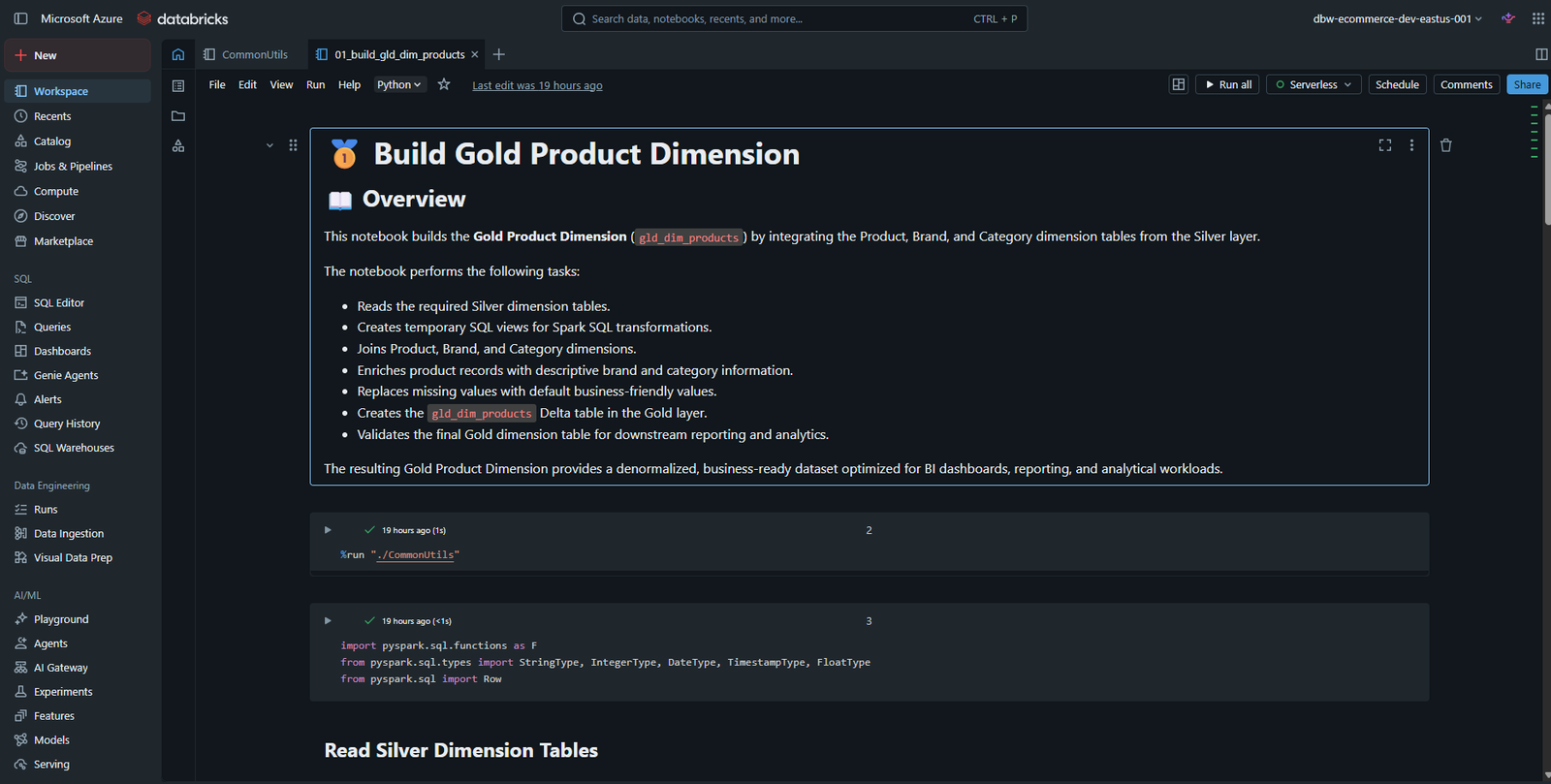
Dimension Transformation Notebook
The Dimension notebooks enrich business reference data by joining related datasets, creating surrogate keys, and generating reporting-friendly attributes.
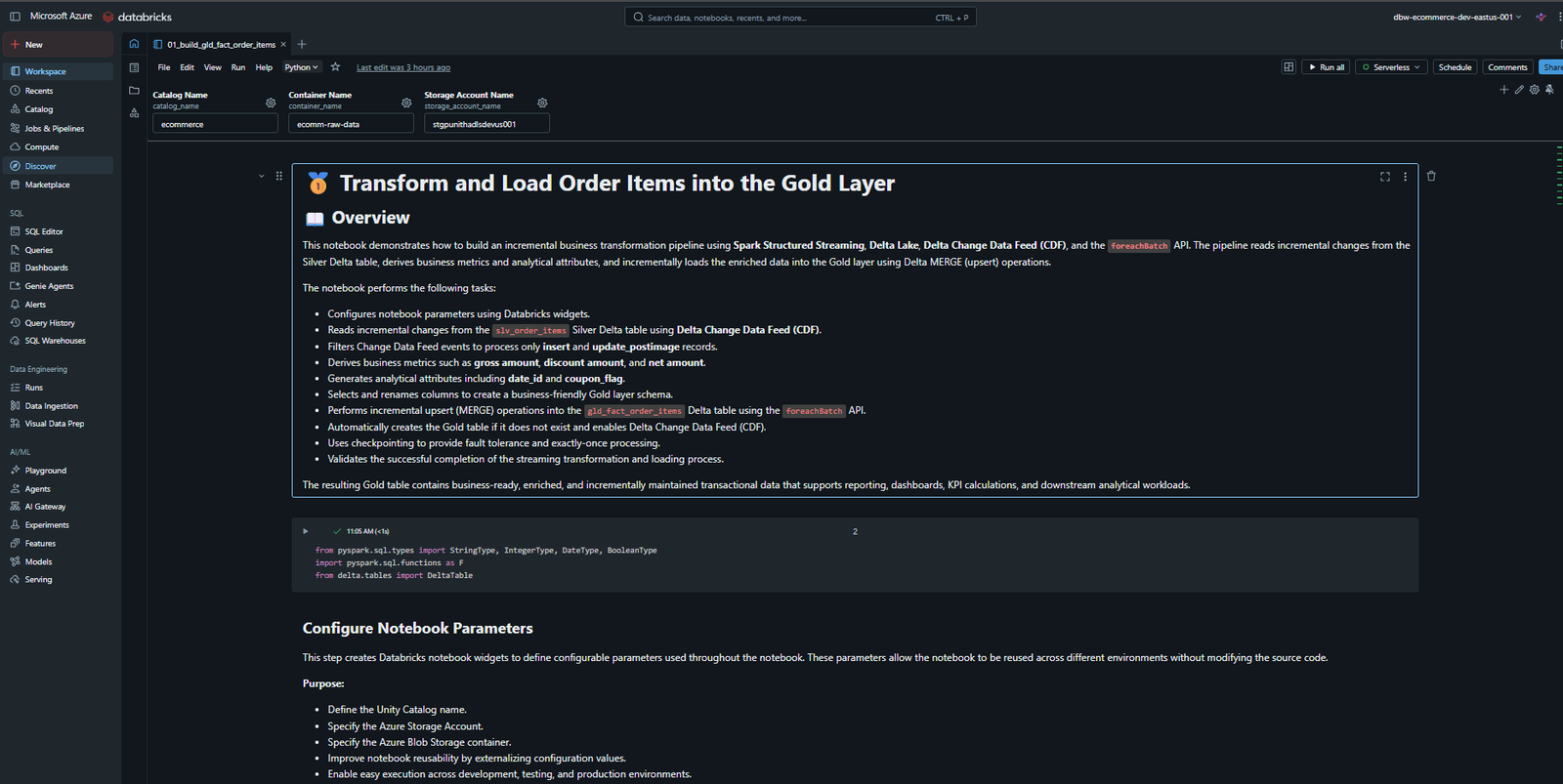
Fact Transformation Notebook
The Fact notebooks combine transactional data with Gold Dimension tables to create analytical Fact tables and business KPI datasets.
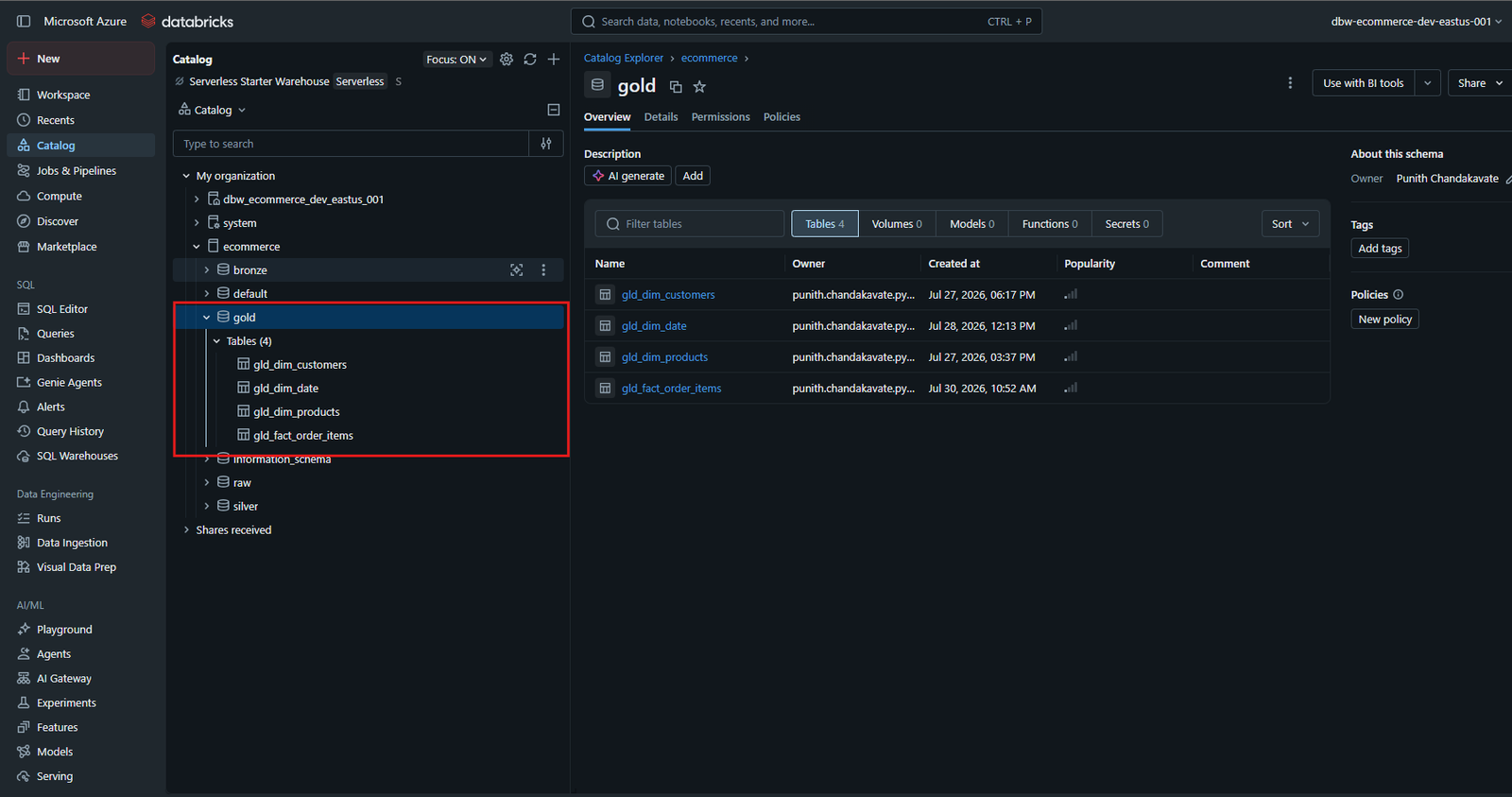
Gold Tables
After successful execution, the curated analytical tables are available in the gold schema.
Best Practices
Follow these best practices to build scalable, reliable, and analytics-ready Gold layer pipelines.
Dimension Tables
- Read only validated Silver Dimension tables.
- Join only trusted business reference datasets.
- Create deterministic surrogate keys.
- Generate reusable business attributes.
- Keep dimensions descriptive rather than transactional.
- Maintain consistent naming conventions.
- Store all curated datasets in Delta format.
- Validate data before publishing.
- Use Unity Catalog for governance and security.
- Design dimensions for Star Schema modeling.
Fact Tables
- Read only trusted Silver Fact tables.
- Always join Facts with Gold Dimension tables.
- Keep Fact tables at the correct business grain.
- Calculate KPIs only once in the Gold layer.
- Create reusable business metrics.
- Build summary tables for dashboard performance.
- Avoid duplicate business calculations.
- Optimize large Fact tables using OPTIMIZE and ZORDER.
- Validate KPI calculations before publishing.
- Design Fact tables for high-performance analytical queries.