Ingest Dimension and Fact Data into the Bronze Layer
Overview
After creating the Raw Schema and External Volume, the next step is to ingest raw source files into the Bronze Layer of the Medallion Architecture.
This notebook reads raw datasets from the Unity Catalog Volume, validates the data using predefined schemas, enriches it with ingestion metadata, and stores it as Delta tables in the Bronze schema.
The Bronze layer preserves the original source data with minimal transformation, providing a reliable foundation for downstream Silver layer processing.
Learning Objectives
After completing this guide, you will be able to:
- Read raw files from Unity Catalog Volumes
- Apply predefined schemas during ingestion
- Add ingestion metadata for lineage and auditing
- Create Delta tables in the Bronze schema
- Validate successful data ingestion
- Prepare data for Silver layer transformations
Architecture
                  Azure Data Lake Storage Gen2
                               │
                   Container: ecomm-raw-data
                               │
          ┌────────────────────┴────────────────────┐
          ▼                                         ▼
  Dimension Data                                Fact Data
(raw.raw_landing)                         (order_items/landing)
          │                                         │
          ▼                                         ▼
 Bronze Dimension Notebook               Bronze Streaming Notebook
          │                                         │
   Apply Schema                                Auto Loader
   Add Metadata                           Structured Streaming
          │                                   Checkpointing
          └───────────────┬─────────────────────────┘
                          ▼
                  Bronze Delta Tables
                          │
      ┌──────────────────────────────────────┐
      ▼                                      ▼
  Dimension Tables                    Fact Tables
  • brz_brands                       • brz_order_items
  • brz_category
  • brz_products
  • brz_customers
  • brz_calendar
Source Data
The Bronze layer ingests both dimension datasets and streaming fact data.
Example directory structure:
Dimension Data
raw_landing
│
├── brands/
│      └── brands.csv
│
├── calendar/
│      └── calendar.csv
│
├── category/
│      └── category.csv
│
├── customers/
│      └── customers.csv
│
└── products/
       └── products.csv
Fact Data
order_items/
└── landing/
      ├── order_items_001.csv
      ├── order_items_002.csv
      └── ...
Ingestion Process
The Bronze notebooks perform the following tasks:
Dimension Tables
- Read CSV files from the Unity Catalog Volume
- Apply predefined Spark schemas
- Validate incoming data
- Add ingestion metadata
- Write Delta tables into the Bronze schema
Fact Tables
- Read streaming CSV files from Azure Data Lake Storage Gen2
- Use Databricks Auto Loader for incremental file discovery
- Automatically infer and evolve schemas
- Capture rescued data for malformed records
- Add ingestion metadata
- Store checkpoint information for fault tolerance
- Write records to the Bronze Delta table using Structured Streaming
Metadata Added
Each Bronze table contains additional metadata columns.
| Column | Description |
|---|---|
_ingested_at |
Timestamp when the record was loaded |
_source_file |
Source file name |
_ingest_time |
Notebook execution timestamp |
These metadata columns help with:
- Data lineage
- Auditing
- Troubleshooting
- Incremental processing
Bronze Tables Created
After successful execution, the following Delta tables are created.
| Bronze Table | Type | Description |
|---|---|---|
| brz_brands | Dimension | Product brand master data |
| brz_calendar | Dimension | Calendar dimension |
| brz_category | Dimension | Product category dimension |
| brz_customers | Dimension | Customer master data |
| brz_products | Dimension | Product master data |
| brz_order_items | Fact | Streaming order item transaction data |
Notebook Workflow
The notebook is organized into the following sections.
1. Import Required Libraries
Imports the required PySpark SQL modules.
from pyspark.sql.types import *
from pyspark.sql import functions as F
2. Configure Unity Catalog
Defines the catalog used throughout the notebook.
catalog_name = "ecommerce"
3. Define Source Paths
Specifies the raw landing location for each dataset stored in the Unity Catalog Volume.
Example:
/Volumes/ecommerce/raw/raw_landing/category/
4. Define Schemas
Creates explicit Spark schemas for each dimension dataset.
Using predefined schemas ensures:
- Consistent data types
- Better performance
- Reduced schema inference overhead
5. Read CSV Files
Reads source files using Spark.
Example:
spark.read.csv(...)
6. Add Metadata
Adds ingestion metadata columns before writing.
Example columns:
- _ingested_at
- _source_file
- _ingest_time
7. Write Bronze Tables
Writes data as managed Delta tables.
Example:
df.write.format("delta") \
    .mode("overwrite") \
    .saveAsTable("ecommerce.bronze.brz_category")
Databricks Notebook
This guide is implemented using the following notebook.
| Notebook | Description |
|---|---|
| 📘 Ingest Dimensions | Reads raw dimension datasets and creates Bronze Delta tables. |
| 📘 Ingest order_items fact | Uses Databricks Auto Loader and Structured Streaming to ingest order item transactions into the Bronze layer. |
Final Resource Hierarchy
Unity Catalog
│
└── ecommerce
      │
      ├── raw
      │      │
      │      └── raw_landing
      │
      └── bronze
             │
             ├── brz_brands
             ├── brz_calendar
             ├── brz_category
             ├── brz_customers
             ├── brz_products
             └── brz_order_items
Data Flow
                               Source Systems
                                      │
          ┌───────────────────────────┴───────────────────────────┐
          ▼                                                       ▼
    Dimension Data                                          Transaction Data
(Unity Catalog Volume)                                 (ADLS Gen2 Landing Zone)
          │                                                       │
          ▼                                                       ▼
                                                        Databricks Auto Loader
Bronze Dimension Notebooks                                        +
                                                         Structured Streaming
          │                                                       │
          ▼                                                       ▼
 Read Source Files                                       Read Streaming Files
 Data Validation                                         Incremental Ingestion
 Schema Validation                                       Schema Inference
 Add Metadata Columns                                    Add Metadata Columns
 Write Bronze Delta Tables                               Write Bronze Delta Table
          │                                                       │
          └───────────────────────────┬───────────────────────────┘
                                      ▼
                              Bronze Delta Tables
                                      │
          ┌───────────────────────────┼───────────────────────────┐
          ▼                           ▼                           ▼
  Dimension Tables              Fact Tables                 Unity Catalog
  • brz_brands                  • brz_order_items           Registration
  • brz_category
  • brz_products
  • brz_customers
  • brz_calendar
                                      │
                                      ▼
                               Silver Layer
Verification Checklist
| Component | Status |
|---|---|
| Raw Files Read Successfully | ✅ |
| Schemas Applied | ✅ |
| Metadata Added | ✅ |
| Bronze Tables Created | ✅ |
| Delta Format Used | ✅ |
| Data Available in Catalog | ✅ |
Notebook Execution
The notebook successfully ingests dimension datasets into the Bronze layer.

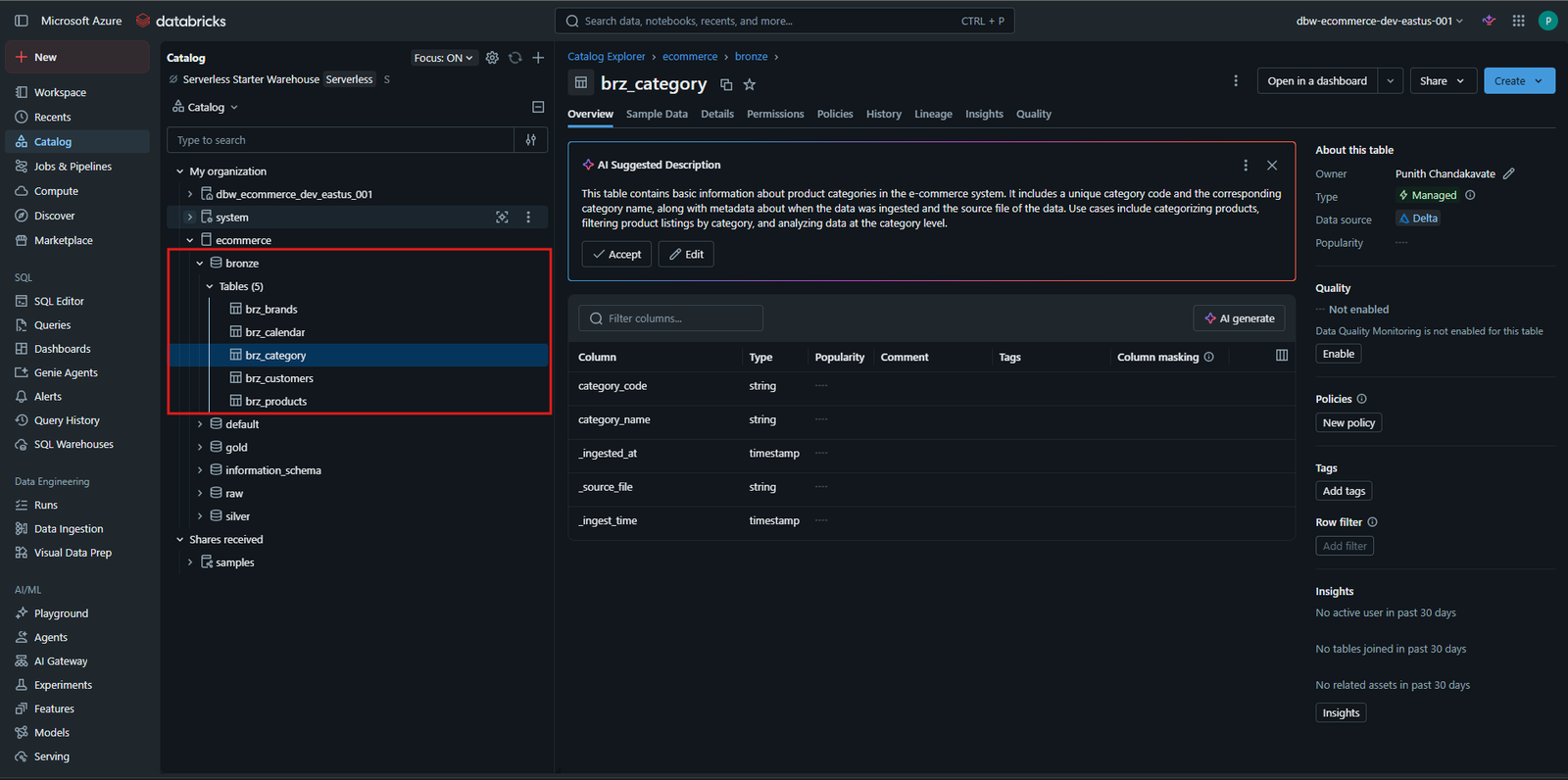
Bronze Tables
After execution, the tables are available in the bronze schema.
Best Practices
- Keep Bronze transformations minimal.
- Preserve source data as-is.
- Always use predefined schemas.
- Store data in Delta format.
- Include ingestion metadata for auditing.
- Use descriptive table names.
- Organize notebooks by ingestion layer.
- Validate data before loading into Silver.
- Partition large datasets where appropriate.
- Use Unity Catalog for centralized governance.